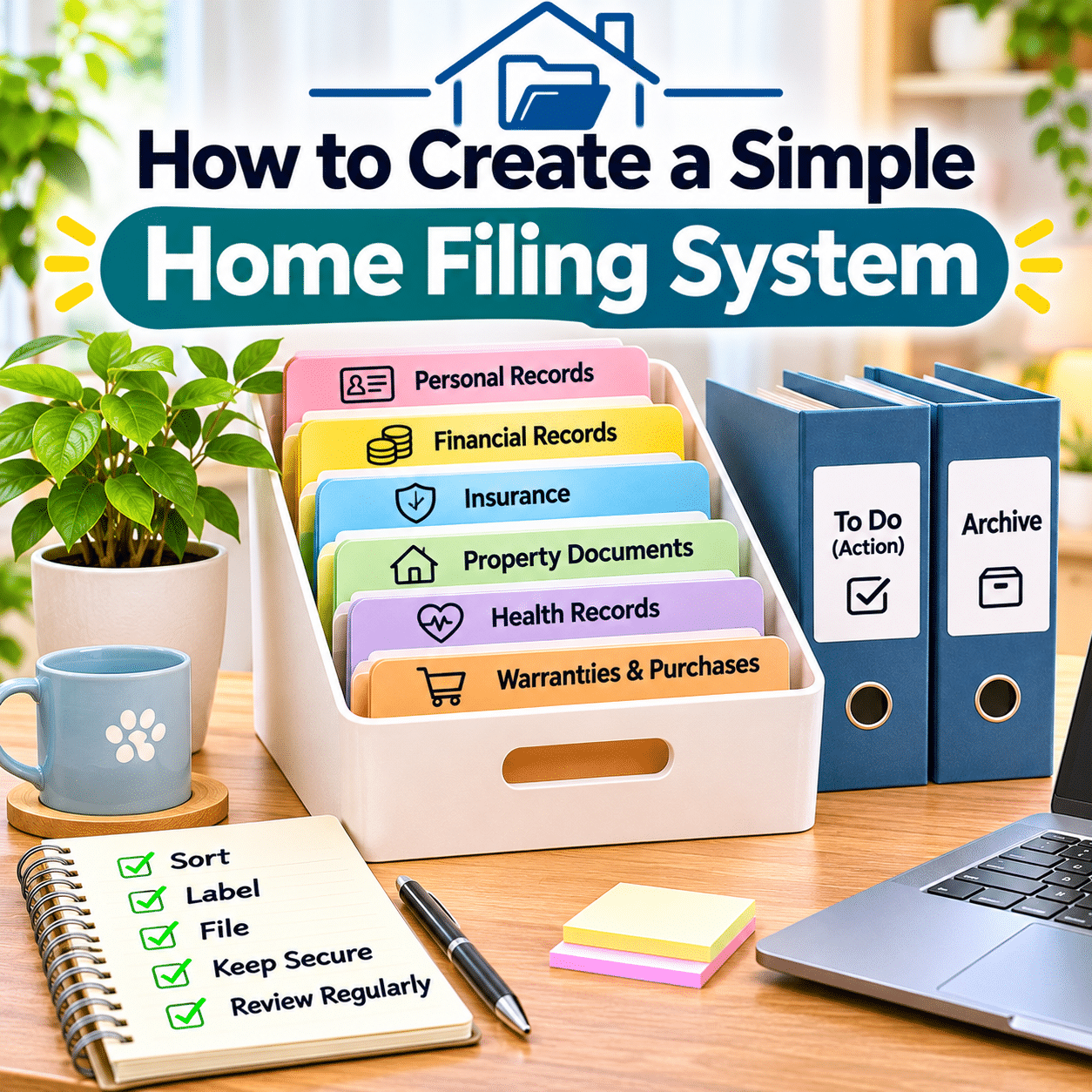
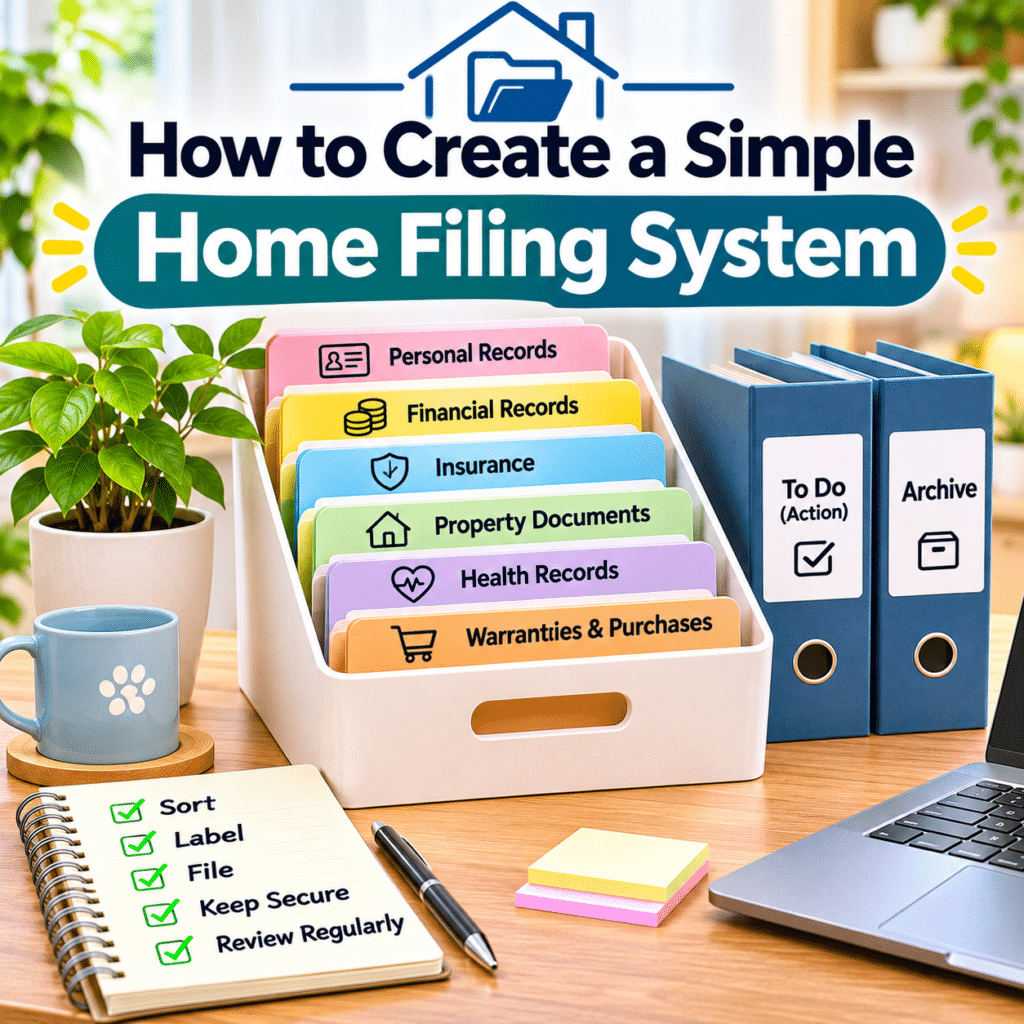
A well-organized home filing system can make everyday life easier by keeping important documents accessible, protected, and easy to manage. From household bills and financial statements to warranties, insurance records, medical documents, and personal paperwork, most households accumulate a surprising amount of information over time.
Without a clear organization system, these documents can quickly become scattered across drawers, shelves, desks, storage boxes, and digital folders. Finding a specific receipt, contract, or important record may become frustrating, especially when the information is needed urgently.
Fortunately, creating an effective home filing system does not require a large filing cabinet, expensive organizational products, or complicated recordkeeping methods.
A simple collection of clearly labeled folders, a dedicated storage location, and a consistent routine can provide a practical foundation for managing household paperwork.
The key is to create a system that matches your needs and remains easy to maintain. A filing arrangement with too many categories may become confusing, while a system with too few categories can make documents difficult to locate.
The most useful approach balances simplicity, accessibility, security, and flexibility.
This guide explains how to create a simple home filing system, including sorting household documents, choosing storage supplies, establishing filing categories, organizing important records, managing incoming paperwork, creating digital backups, and maintaining the system over time.
Whether you live in a small apartment, manage a busy household, or simply want to reduce paper clutter, the goal is to build a reliable organization system that makes important information easier to find whenever you need it.
1. Understand What a Home Filing System Is
A home filing system is an organized method for storing and retrieving household documents.
It provides designated locations for different types of paperwork so that important information does not become mixed with everyday clutter.
A basic home filing system may include:
- Labeled folders.
- Document envelopes.
- A filing box.
- A small filing cabinet.
- A dedicated drawer.
- Digital document folders.
- Secure storage for sensitive records.
The system does not need to be elaborate.
For example, a household with relatively few documents may need only one portable filing box and several clearly labeled folders.
A household managing multiple properties, business activities, or extensive financial records may require additional categories and storage space.
The purpose remains the same: to make documents easy to identify, store, protect, and retrieve.
2. Why Every Household Benefits From Organized Records
Household paperwork often contains information that may be needed for future decisions, administrative procedures, financial planning, or unexpected situations.
A practical filing system can help:
- Reduce paper clutter.
- Locate important records quickly.
- Keep related documents together.
- Prevent accidental disposal of useful paperwork.
- Simplify household administration.
- Support financial recordkeeping.
- Make warranty information easier to find.
- Protect sensitive personal information.
- Reduce unnecessary duplicate documents.
- Prepare for unexpected administrative needs.
Good filing habits also make it easier to identify which documents are current and which may no longer be needed.
However, the system should remain manageable.
A filing method that requires extensive effort every time a document arrives is unlikely to remain useful.
3. Begin by Identifying Your Filing Needs
Before purchasing folders or storage containers, consider the kinds of paperwork your household generates.
Ask yourself:
- Which documents do I receive regularly?
- Which records must be retained for future reference?
- Do I manage paper bills or electronic statements?
- Do I need to organize property documents?
- Do I keep product receipts and warranties?
- Are there household members with separate records?
- Do I maintain business-related paperwork at home?
- Which documents contain sensitive information?
- How frequently do I need to retrieve older records?
Your answers will help determine the appropriate filing categories and storage methods.
Avoid copying an elaborate filing system that does not match your actual needs.
4. Gather Household Documents in One Place
The first practical step is to collect paperwork from around your home.
Check common storage locations such as:
- Desk drawers.
- Bookshelves.
- Kitchen counters.
- Bedside tables.
- Storage cabinets.
- Document boxes.
- Bags and briefcases.
- Filing drawers.
- Home office shelves.
- Areas where mail is normally placed.
Gather the documents into one manageable sorting area.
If the collection is large, work in smaller batches rather than spreading everything across the house.
Keep highly sensitive or irreplaceable documents secure throughout the process.
The purpose is to understand what you have before deciding how to organize it.
5. Sort Documents Into Basic Groups
Begin with broad categories rather than creating dozens of detailed folders immediately.
A practical first sorting system might include:
| Category | Examples |
|---|---|
| Personal Records | Identification documents, certificates, important personal records |
| Financial Records | Bank statements, tax documents, financial agreements |
| Household Records | Utility bills, service agreements, maintenance records |
| Property Documents | Ownership records, leases, property-related contracts |
| Insurance | Policies, renewal notices, claims |
| Health Records | Medical reports, vaccination records, important health documents |
| Purchases & Warranties | Receipts, warranties, product documentation |
| Work & Education | Employment records, certificates, educational documents |
| Action Required | Documents needing payment, signatures, or responses |
These categories provide a starting point.
You can combine or divide them according to the volume of paperwork.
6. Separate Active Documents From Long-Term Records
Not every document needs the same storage location.
A useful filing system distinguishes between active paperwork and long-term records.
Active documents
These require regular attention or may be needed soon.
Examples include:
- Unpaid bills.
- Forms awaiting signatures.
- Current applications.
- Upcoming renewal notices.
- Documents needed for ongoing projects.
Keep active documents in an accessible location.
Long-term records
These are retained primarily for reference or legal, financial, or personal reasons.
Examples include:
- Important certificates.
- Property records.
- Completed contracts.
- Historical financial documents.
- Insurance records.
- Archived household information.
Store long-term records in a more secure location.
This separation prevents active paperwork from becoming buried among older documents.
7. Create an Action Required Folder
An Action Required folder is one of the most useful parts of a home filing system.
It provides a temporary location for documents that need attention.
Examples include:
- Bills awaiting payment.
- Forms requiring completion.
- Letters needing responses.
- Renewal notices.
- Documents requiring review.
- Paperwork awaiting submission.
Review this folder regularly.
Once an item has been handled, move it to its permanent category or dispose of it appropriately.
Avoid allowing completed paperwork to remain indefinitely in the Action Required folder.
A clear distinction between pending and completed documents helps prevent confusion.
8. Choose a Suitable Filing Storage Location
A home filing system works best when documents have one consistent storage location.
Possible options include:
- A dedicated desk drawer.
- A portable filing box.
- A small filing cabinet.
- A storage shelf.
- A lockable cabinet.
- A document organizer.
- A combination of physical and digital storage.
Choose a location that is:
- Dry.
- Clean.
- Accessible.
- Protected from unnecessary sunlight.
- Away from excessive heat.
- Suitable for the document volume.
- Secure enough for sensitive records.
Avoid storing important papers near sinks, damp walls, or locations where spills are likely.
For especially valuable documents, consider more protective storage.
9. Choose the Right Filing Supplies
You do not need many products to create a practical filing system.
Useful supplies may include:
- File folders.
- Hanging folders.
- Document envelopes.
- Folder labels.
- A filing box or cabinet.
- Dividers.
- A pen or label maker.
- A document tray.
- Protective sleeves where appropriate.
Choose supplies based on the size and type of documents you own.
Avoid purchasing excessive organizers before sorting your paperwork.
A simple filing box with well-labeled folders may be more effective than a large cabinet with unclear categories.
10. Understand Different Types of File Folders
Different folder styles serve different purposes.
Standard file folders
Suitable for grouping ordinary documents.
Hanging folders
Useful in compatible filing drawers or cabinets.
Expanding folders
Convenient for portable storage and a limited number of categories.
Document envelopes
Helpful for keeping related papers together.
Protective sleeves
Useful for selected documents that need protection from frequent handling.
Archival-quality folders
May be appropriate for valuable documents intended for long-term preservation.
Choose the simplest format that supports your needs.
Avoid folding important original documents unnecessarily.
11. Create Clear and Consistent Folder Labels
Folder labels should make documents easy to locate without requiring guesswork.
Use straightforward names such as:
- Banking.
- Taxes.
- Insurance.
- Home Maintenance.
- Utilities.
- Property Documents.
- Medical Records.
- Warranties.
- Education.
- Important Certificates.
Avoid vague labels such as Miscellaneous or Important Papers whenever possible.
If a category becomes too large, divide it into more specific folders.
For example, Insurance may eventually be separated into Home Insurance, Vehicle Insurance, and Health Insurance.
Start with broad categories and add detail only when needed.
12. Organize Personal Identification and Vital Records
Personal records often include some of the most important documents in a household.
Examples may include:
- Birth certificates.
- Marriage certificates.
- Identification documents.
- Citizenship or residency records.
- Passports.
- Name-change records.
- Other official certificates.
These documents may be difficult or time-consuming to replace.
Store originals securely and protect them from moisture, fire, theft, and accidental disposal.
Some documents may require special handling or storage conditions.
Keep a record of where important originals are stored.
Digital copies may be useful for reference, but they do not always replace legally required originals.
13. Organize Financial Documents
Financial records can accumulate through banking, borrowing, investing, and everyday household administration.
Possible categories include:
- Bank Accounts.
- Loans.
- Credit Accounts.
- Investments.
- Financial Agreements.
- Payment Confirmations.
- Annual Statements.
Use separate folders when the volume justifies it.
Avoid storing unnecessary copies of documents containing account numbers or other sensitive information.
For digital financial records, use secure storage and appropriate access controls.
Document retention requirements vary according to the type of record and applicable laws.
14. Create a Dedicated Tax Records Folder
Tax documents are often easier to manage when grouped by year.
A simple arrangement might include:
Taxes
- Current Year.
- Previous Year.
- Earlier Records.
Within each year, keep relevant documents together.
Examples may include:
- Tax returns.
- Supporting income records.
- Deduction documentation.
- Payment confirmations.
- Official correspondence.
Retention periods vary by jurisdiction, taxpayer circumstances, and document type.
Check applicable tax authority guidance before disposing of records.
Do not assume that one universal retention period applies to every household.
15. Organize Household Bills and Utilities
Household bills may include:
- Electricity.
- Water.
- Internet.
- Telephone.
- Waste collection.
- Building management fees.
- Other recurring services.
You may not need to retain every routine bill permanently.
Consider whether documents are needed for:
- Payment verification.
- Disputes.
- Budget tracking.
- Tax purposes.
- Contract requirements.
- Property management.
A simple folder structure might include Utilities and Household Services.
If most statements are digital, physical storage may only be needed for selected records.
16. Keep Property Documents Together
Property-related paperwork may be especially important.
Examples include:
- Ownership documents.
- Purchase agreements.
- Lease contracts.
- Mortgage records.
- Property tax records.
- Renovation contracts.
- Building permits.
- Maintenance agreements.
- Relevant legal correspondence.
Consider using separate folders for each property when necessary.
Keep irreplaceable originals in secure storage.
Store copies of frequently referenced information in a more accessible location if appropriate.
Property record retention and legal requirements vary by jurisdiction.
Consult relevant local guidance before disposing of significant property documents.
17. Organize Insurance Records
Insurance documents may contain important information about coverage, claims, exclusions, and renewal dates.
A practical insurance folder might include:
- Current policies.
- Coverage summaries.
- Renewal notices.
- Payment confirmations.
- Claims correspondence.
- Relevant supporting documents.
Separate different insurance types when necessary.
For example:
- Home Insurance.
- Vehicle Insurance.
- Health Insurance.
- Life Insurance.
Keep current policy information accessible.
Archive older policies when they may still be needed for claims or legal purposes.
Review retention requirements before disposal.
18. Create a Medical Records Folder
Medical records may include:
- Test results.
- Vaccination records.
- Treatment summaries.
- Prescription information.
- Specialist reports.
- Insurance claims.
- Important medical correspondence.
These records contain sensitive personal information.
Store them securely and limit access appropriately.
If several household members have separate records, use clearly identified folders.
For digital copies, choose secure storage and avoid sharing sensitive documents unnecessarily.
Medical record retention needs vary by document type and personal circumstances.
19. Organize Education and Employment Records
Education and employment documents may remain useful for many years.
Examples include:
- Diplomas.
- Academic transcripts.
- Professional certificates.
- Employment agreements.
- Training records.
- Work-related correspondence.
- Retirement documentation.
- Professional licenses.
Keep important original certificates secure.
For frequently used records, maintain suitable copies when appropriate.
Separate current employment paperwork from historical records if the collection is large.
Do not dispose of documents that may be needed for future employment, licensing, benefits, or legal purposes without checking relevant requirements.
20. Create a Purchases and Warranties Folder
Receipts, warranty cards, and purchase documentation can be useful when products need repair, replacement, or support.
Common examples include:
- Household appliances.
- Computers.
- Smartphones.
- Furniture.
- Home improvement equipment.
- Electronics.
- Other significant purchases.
A practical folder might contain:
- Purchase receipt.
- Warranty information.
- Model identification.
- Service records.
- Relevant correspondence.
For large purchases, consider storing the documents together in a labeled envelope.
You may also maintain digital copies.
Check warranty terms before discarding receipts or related records.
21. Organize Home Maintenance Records
Home maintenance documents help track repairs and services.
Examples include:
- Appliance servicing.
- Plumbing repairs.
- Electrical work.
- Air conditioner maintenance.
- Pest control.
- Painting.
- Renovations.
- Equipment installation.
A simple record may include:
| Information | Example |
|---|---|
| Service Date | Date work was completed |
| Equipment or Area | Air conditioner |
| Service Provider | Company or technician |
| Work Performed | Cleaning and inspection |
| Cost | Amount paid |
| Warranty Details | Relevant coverage |
| Next Review | Suggested future maintenance |
These records can help when evaluating recurring problems or planning future maintenance.
Store invoices and service agreements with the relevant equipment or property folder.
22. Keep Product Manuals Organized
Instruction manuals can accumulate quickly.
Not every manual needs to remain in paper form.
Before keeping a printed manual, consider:
- Whether the product is still owned.
- Whether the information is available digitally.
- Whether the manual contains important safety instructions.
- Whether it is required for warranty or servicing.
- Whether the product has unusual operating procedures.
For manuals you retain, organize them by equipment type or household area.
Examples include Kitchen Appliances, Electronics, and Home Equipment.
Digital manuals should come from trustworthy sources, preferably the manufacturer.
23. Create a Separate Folder for Important Contracts
Contracts may require special attention because they can establish ongoing obligations or legal rights.
Examples include:
- Rental agreements.
- Service contracts.
- Loan agreements.
- Purchase agreements.
- Employment contracts.
- Subscription agreements with significant terms.
Keep signed versions and relevant amendments together.
Include supporting correspondence when necessary.
Avoid mixing active contracts with unrelated paperwork.
Review the contract’s terms and applicable legal requirements before deciding when it can be discarded.
24. Organize Documents by Year When Appropriate
Some document categories benefit from chronological organization.
Examples include:
- Taxes.
- Financial statements.
- Annual insurance records.
- Maintenance records.
- Household expenses.
A simple annual structure might look like:
Financial Records
-
-
-
- Earlier Years.
Within each year, documents can be arranged by date or type.
However, not every category needs annual folders.
Vital records, current contracts, and important certificates may be easier to organize by subject.
Choose the method that makes retrieval simplest.
25. Use Color Coding Only When Helpful
Color coding can make filing categories easier to recognize.
For example:
- Blue for financial records.
- Green for household documents.
- Yellow for warranties.
- Red for important legal records.
- Purple for personal records.
However, colors should supplement written labels rather than replace them.
Not everyone remembers color associations consistently.
If color coding adds complexity, skip it.
Clear folder names are usually more important than decorative organization methods.
26. Create a Simple Incoming Mail Station
Incoming mail is a common source of household paper clutter.
A dedicated mail station can help prevent documents from spreading across counters and desks.
Choose one location for incoming paperwork.
A simple setup might include:
- Incoming Mail.
- Action Required.
- To File.
- Recycle or Shred.
When mail arrives, sort it into the appropriate category.
Avoid leaving unopened letters in multiple locations.
For sensitive documents, ensure the collection area is appropriately secure.
27. Establish a Regular Paper Processing Routine
A filing system works best when incoming paperwork is processed consistently.
A weekly review may include:
- Open and sort incoming mail.
- Identify bills or deadlines.
- Complete urgent actions.
- File documents that need retention.
- Digitize selected records when appropriate.
- Recycle unnecessary papers.
- Securely destroy sensitive documents no longer needed.
Avoid filing documents simply because you are unsure what to do with them.
When retention requirements are uncertain, investigate before disposal.
A consistent routine can prevent paperwork from accumulating into large, difficult-to-manage piles.
28. Understand Which Documents to Keep
Document retention is an important part of home filing.
However, retention periods depend on several factors:
- Applicable laws.
- Tax requirements.
- Contract terms.
- Insurance obligations.
- Property ownership.
- Personal circumstances.
- Potential disputes.
- Administrative requirements.
A practical starting point is to classify documents by retention purpose.
| Document Type | General Retention Approach |
|---|---|
| Vital records | Preserve important originals securely |
| Current contracts | Keep while active and longer when legally necessary |
| Tax records | Follow applicable tax authority requirements |
| Property documents | Retain according to ownership and legal needs |
| Insurance policies | Keep current records and relevant historical claim documentation |
| Product warranties | Keep while coverage or related claims may apply |
| Routine household notices | Review usefulness and legal requirements |
| Temporary paperwork | Dispose of securely when no longer needed |
Avoid applying a single fixed retention period to every document.
When uncertain, seek reliable guidance for your jurisdiction and circumstances.
29. Know When to Archive Documents
Archiving means moving documents out of everyday filing while preserving them for future reference.
Examples include:
- Completed contracts.
- Historical financial statements.
- Older tax records.
- Past insurance documents.
- Previous employment records.
- Completed property projects.
Archived records do not need to occupy the most accessible storage space.
However, they should remain organized and protected.
Use clear labels that identify the category and relevant date range.
For example:
Home Maintenance — 2022–2025
Avoid creating an archive box filled with unrelated documents.
An archive should remain searchable even when it is rarely opened.
30. Dispose of Unnecessary Documents Securely
Paper disposal requires special care when documents contain sensitive information.
Examples include:
- Account numbers.
- Identification details.
- Financial information.
- Medical information.
- Signatures.
- Private correspondence.
For sensitive records that are no longer required, use an appropriate secure destruction method.
Cross-cut shredding or a reputable secure document destruction service may be suitable.
Ordinary recycling is appropriate for non-sensitive paperwork.
Before disposal, verify that the document is no longer needed for legal, financial, administrative, or personal reasons.
31. Decide Whether to Create a Digital Filing System
Digital filing can complement physical document storage.
Advantages may include:
- Reduced paper volume.
- Easier searching.
- Convenient access.
- Simpler sharing when appropriate.
- Backup possibilities.
- More flexible organization.
However, digital filing introduces additional responsibilities.
These include:
- Data security.
- File naming.
- Backup management.
- Access permissions.
- Device reliability.
- Long-term file readability.
A digital system does not automatically eliminate the need to retain original paper documents.
Use it as a practical complement to physical filing.
32. Create Simple Digital Folder Categories
Digital folders can mirror the categories used in your physical filing system.
For example:
Home Documents
- Personal Records
- Financial Records
- Taxes
- Property
- Insurance
- Health
- Household Services
- Purchases & Warranties
- Work & Education
- Archives
Consistency between physical and digital categories makes documents easier to locate.
Avoid creating too many nested folders.
If finding a document requires navigating through numerous levels, the structure may be unnecessarily complicated.
33. Use Consistent Digital File Names
Clear file names make documents easier to identify.
A useful format is:
YYYY-MM-DD_Document-Type_Description
Examples:
- 2026-01-15_Electricity_Bill.pdf
- 2026-03-10_Appliance_Warranty.pdf
- 2026-05-22_Home_Maintenance_Invoice.pdf
- 2026-08-01_Insurance_Renewal.pdf
Using the year-month-day format helps files sort chronologically.
Include enough detail to identify the document without making the name excessively long.
Avoid unnecessary sensitive information in filenames, especially when files may be shared.
34. Scan Important Documents Carefully
Scanning can create useful digital reference copies.
Possible tools include:
- A document scanner.
- A multifunction printer.
- A reputable scanning application.
- A smartphone with suitable document scanning capabilities.
When scanning:
- Use adequate lighting.
- Place the document on a flat surface.
- Capture every relevant page.
- Check readability.
- Confirm that edges are not missing.
- Save the file in a suitable format.
- Use a descriptive filename.
- Store it in the correct folder.
- Back it up appropriately.
A scan should accurately represent the original.
Do not discard original documents merely because a digital copy exists.
35. Protect Digital Documents With Appropriate Security
Digital records may contain highly sensitive information.
Protect them using suitable security practices.
These may include:
- Strong, unique passwords.
- Multi-factor authentication.
- Device encryption.
- Secure cloud storage.
- Appropriate access permissions.
- Regular software updates.
- Reliable backups.
- Careful sharing practices.
Avoid placing sensitive files in publicly accessible folders.
Do not share unrestricted links to private documents.
When using shared household storage, consider which people should have access to particular categories.
36. Create Reliable Backups
Digital files can be lost through device failure, accidental deletion, theft, or other unexpected events.
A backup system reduces dependence on one storage location.
A commonly used approach is the 3-2-1 backup principle:
- Keep three copies of important data.
- Use two different types of storage or storage systems.
- Keep one copy off-site.
The exact implementation may vary.
For example, you might keep a primary copy on your computer, a backup on an external drive, and another encrypted backup in a suitable cloud service.
Periodically verify that backups can actually be restored.
A backup that cannot be accessed when needed provides limited protection.
37. Protect Irreplaceable Physical Documents
Some original documents require more protection than ordinary paperwork.
Examples include:
- Vital records.
- Important legal documents.
- Property ownership records.
- Certain certificates.
- Original signed agreements.
- Other difficult-to-replace records.
Consider secure storage appropriate to their importance.
Options may include a suitable home safe or other secure document storage arrangement.
Understand that products described as fire-resistant or water-resistant have specific performance limitations.
Choose protection based on documented ratings and realistic risks.
Keep a separate record of where critical originals are stored.
38. Create an Emergency Document Reference List
An emergency reference list can help you locate essential information during unexpected situations.
It might identify:
- Where important originals are stored.
- Insurance policy information.
- Emergency contact details.
- Relevant service providers.
- Important account institutions.
- Property documentation locations.
- Essential household instructions.
Avoid placing passwords, full account credentials, or other sensitive secrets in an unsecured reference list.
Store the list appropriately.
If trusted household members need access during emergencies, establish a secure and practical access arrangement.
Review the information periodically.
39. Maintain Your Filing System Over Time
A home filing system needs occasional attention.
However, maintenance should not become complicated.
Weekly tasks
- Sort incoming paperwork.
- Review Action Required documents.
- File completed items.
- Remove unnecessary non-sensitive papers.
- Securely dispose of sensitive documents when appropriate.
Monthly tasks
- Review active folders.
- Check upcoming renewals.
- Organize recent receipts.
- Update digital folders.
- Confirm important documents are accessible.
Annual tasks
- Review filing categories.
- Archive completed records.
- Check applicable retention requirements.
- Inspect physical storage conditions.
- Verify digital backups.
- Update emergency reference information.
- Remove unnecessary duplicates.
These routines help keep the system manageable as documents accumulate.
40. Avoid Common Home Filing Mistakes
Even a well-intentioned filing system can become difficult to use.
Creating too many categories
Excessive detail makes filing slower.
Better approach: Begin with broad categories and divide them only when necessary.
Using vague folder labels
Labels such as Miscellaneous make documents difficult to retrieve.
Better approach: Use clear subject-based names.
Keeping every piece of paper
Unnecessary records can overwhelm storage.
Better approach: Apply appropriate retention decisions and securely dispose of unneeded documents.
Filing documents before taking action
Unpaid bills or incomplete forms may become forgotten.
Better approach: Keep pending documents in a separate Action Required folder.
Mixing sensitive and ordinary paperwork
Important records may become difficult to protect.
Better approach: Use secure storage for confidential documents.
Relying on one digital copy
Device failure or accidental deletion may cause data loss.
Better approach: Maintain reliable backups.
Discarding originals after scanning
Some records require original documents.
Better approach: Confirm legal and administrative requirements before disposal.
Forgetting regular maintenance
Even a good system becomes cluttered without consistent use.
Better approach: Establish simple weekly and annual reviews.
Step-by-Step Guide: Set Up a Simple Home Filing System
The following process combines the essential steps into one practical project.
Step 1: Identify your document needs
Consider the types of paperwork your household regularly receives and retains.
Step 2: Choose a sorting area
Select a clean, spacious surface where documents can be reviewed safely.
Step 3: Gather existing paperwork
Collect documents from drawers, shelves, boxes, and other storage locations.
Step 4: Protect sensitive originals
Set aside important and irreplaceable records in a secure location.
Step 5: Sort documents into broad categories
Begin with personal, financial, household, property, insurance, and other relevant groups.
Step 6: Separate active paperwork
Create a temporary group for documents requiring action.
Step 7: Identify unnecessary papers
Remove obvious duplicates and unneeded non-sensitive material.
Check retention requirements before disposing of important records.
Step 8: Choose a storage location
Select a dry, accessible, and appropriately secure area.
Step 9: Gather filing supplies
Use folders, labels, and a suitable storage container.
Step 10: Create main category folders
Label each folder clearly.
Step 11: Add subcategories when necessary
Divide large categories into more specific groups.
Step 12: Organize documents within folders
Arrange them by date, subject, or another consistent method.
Step 13: Create an Action Required folder
Keep pending documents separate from completed records.
Step 14: Establish an incoming mail location
Choose one place where new paperwork will be collected.
Step 15: Create an archive section
Move older records that must be retained but are rarely needed.
Step 16: Secure important originals
Store vital documents and sensitive records appropriately.
Step 17: Create digital folders
Use categories that correspond to your physical filing system.
Step 18: Scan selected documents
Create readable digital copies where useful.
Step 19: Apply consistent filenames
Use descriptive names and dates.
Step 20: Back up important digital records
Maintain suitable copies in separate storage locations.
Step 21: Create a document location reference
Record where critical documents are stored without exposing sensitive information.
Step 22: Establish a weekly filing routine
Process incoming paperwork and pending items.
Step 23: Review the system periodically
Adjust categories and storage as household needs change.
Step 24: Maintain appropriate document retention
Check applicable requirements before discarding records.
Practical Home Filing System Checklist
Use this checklist to create and maintain a reliable household document organization system.
Planning
- Identify common household document types.
- Determine which records require secure storage.
- Choose a suitable filing location.
- Select practical storage supplies.
- Keep the system simple enough to maintain.
Sorting
- Gather existing paperwork.
- Separate active and long-term records.
- Identify important originals.
- Group documents by subject.
- Remove unnecessary duplicates.
- Review retention requirements before disposal.
Physical Filing
- Create clearly labeled folders.
- Organize financial records.
- Separate tax documents.
- Store property records.
- Organize insurance policies.
- File medical records securely.
- Group receipts and warranties.
- Create an archive section.
Incoming Paperwork
- Establish one incoming mail location.
- Create an Action Required folder.
- Review pending documents regularly.
- File completed paperwork.
- Recycle unnecessary non-sensitive papers.
- Securely destroy sensitive documents when appropriate.
Digital Filing
- Create clear digital folder categories.
- Use consistent file names.
- Scan selected documents.
- Check scan readability.
- Protect sensitive files.
- Enable appropriate account security.
- Maintain reliable backups.
Long-Term Maintenance
- Review incoming paperwork weekly.
- Check active folders monthly.
- Archive older documents when appropriate.
- Review retention requirements annually.
- Verify digital backups.
- Update emergency document references.
- Adjust the filing system when household needs change.
Common Home Filing Problems and Practical Solutions
| Problem | Possible Cause | Practical Solution |
|---|---|---|
| Papers accumulate on counters | No incoming document location | Create one designated mail station |
| Important records are difficult to find | Inconsistent categories | Use clear subject-based folders |
| Filing takes too long | Too many categories | Simplify the folder structure |
| Bills are forgotten | Pending documents mixed with archives | Create an Action Required folder |
| Filing cabinet becomes overcrowded | Unnecessary records and duplicates | Review retention and archive appropriately |
| Sensitive documents are exposed | Inadequate storage security | Use secure physical and digital storage |
| Digital files are difficult to locate | Inconsistent naming | Adopt a simple naming convention |
| Scanned documents become lost | No folder or backup system | Organize files and maintain backups |
| Old records are discarded too early | Retention requirements not checked | Consult applicable guidance |
| Filing system becomes disorganized again | No maintenance routine | Schedule short regular reviews |
Frequently Asked Questions About Creating a Home Filing System
1. What is the easiest home filing system for beginners?
A simple system uses a small filing box, clearly labeled folders, and a separate Action Required folder.
Begin with broad categories such as Personal, Financial, Household, Insurance, and Warranties.
Add more categories only when necessary.
2. How many folders should a home filing system have?
There is no ideal number.
The appropriate number depends on the volume and variety of documents.
Start with a manageable collection of categories and expand only when folders become difficult to use.
3. What documents should I keep at home?
Common examples include important personal records, current contracts, relevant financial documents, insurance policies, property records, and warranty information.
Retention needs vary by document type and applicable laws.
4. Should I organize documents by category or date?
Both methods can be useful.
Organize broad categories by subject, then arrange time-sensitive records chronologically when appropriate.
For example, tax records may be grouped by year, while vital records are usually easier to organize by type.
5. Do I need a filing cabinet?
No.
A portable filing box, expanding folder, or dedicated drawer may be sufficient for a smaller household.
Choose storage based on document volume, accessibility, and security requirements.
6. How should I organize important original documents?
Keep them in a secure location protected from foreseeable risks such as moisture, theft, and accidental disposal.
Use suitable protective storage and maintain a reference to their location.
7. Can I scan documents and throw away the originals?
Sometimes, but not always.
Certain legal, financial, administrative, and personal records may require original copies.
Confirm applicable requirements before discarding originals.
8. What is the best way to organize household bills?
Use a Household Bills or Utilities folder.
Separate bills by provider or year when necessary.
Keep records according to payment verification needs and applicable retention requirements.
9. How should I organize receipts and warranties?
Group important purchase receipts with their corresponding warranty information.
Use separate folders for major appliances, electronics, or other significant purchases when helpful.
10. How often should I file household paperwork?
A weekly filing routine is a practical starting point.
Process incoming documents, complete necessary actions, and move retained records to their proper folders.
11. How long should I keep financial documents?
Retention periods depend on the document type, legal requirements, tax rules, and individual circumstances.
Consult applicable official guidance rather than using one universal retention period.
12. What should I do with old documents?
Review whether they are still needed.
Archive records that must be retained.
Recycle non-sensitive documents that are no longer useful and securely destroy sensitive records when appropriate.
13. Is digital filing better than paper filing?
Each method has advantages.
Digital filing can improve searching and backup options, while physical filing remains important for certain originals.
A combination of both often provides practical flexibility.
14. How can I keep digital documents secure?
Use strong passwords, multi-factor authentication, appropriate encryption, controlled access, and reliable backups.
Avoid sharing sensitive files through unrestricted public links.
15. What is the most important habit for maintaining a home filing system?
Consistently processing incoming paperwork is one of the most useful habits.
When new documents are reviewed and placed in the correct location promptly, the entire system becomes easier to maintain.
Final Thoughts
Creating a simple home filing system is a practical way to reduce household paper clutter and make important information easier to manage.
A reliable system does not require expensive storage furniture or complicated organizational methods. It begins with clear categories, consistent folder labels, appropriate storage, and regular filing habits.
Start by gathering your existing documents and separating active paperwork from records that need long-term retention.
Then create a manageable collection of folders for personal information, financial records, household services, insurance, property documents, warranties, and other relevant categories.
Protect sensitive and irreplaceable records with suitable physical storage and secure digital practices.
Digital copies can provide additional convenience, but important originals should be preserved whenever required.
Remember that a filing system should evolve with your household. As new responsibilities, purchases, and records appear, adjust categories gradually rather than rebuilding the entire arrangement.
A short weekly filing routine and occasional review can prevent paperwork from becoming overwhelming.
With a thoughtful structure and consistent habits, managing household documents becomes a simple part of everyday life rather than a recurring source of frustration.
The best home filing system is not the most elaborate one—it is the system that helps you find the right document quickly, protects important information, and remains easy to maintain year after year.